
Best Website Builders for Small Businesses in 2026: Top 12 Compared
A professional website is one of the most valuable assets a small business can have. It helps customers discover your products or services, builds credibility, and creates opportunities to generate leads or sales around the clock.
The challenge is choosing the right website builder. Some platforms prioritize simplicity, while others offer advanced customization, ecommerce features, or search engine optimization (SEO) tools.
In this guide, we’ll compare the best website builders for small businesses in 2026 so you can find the platform that fits your goals, technical skills, and budget.
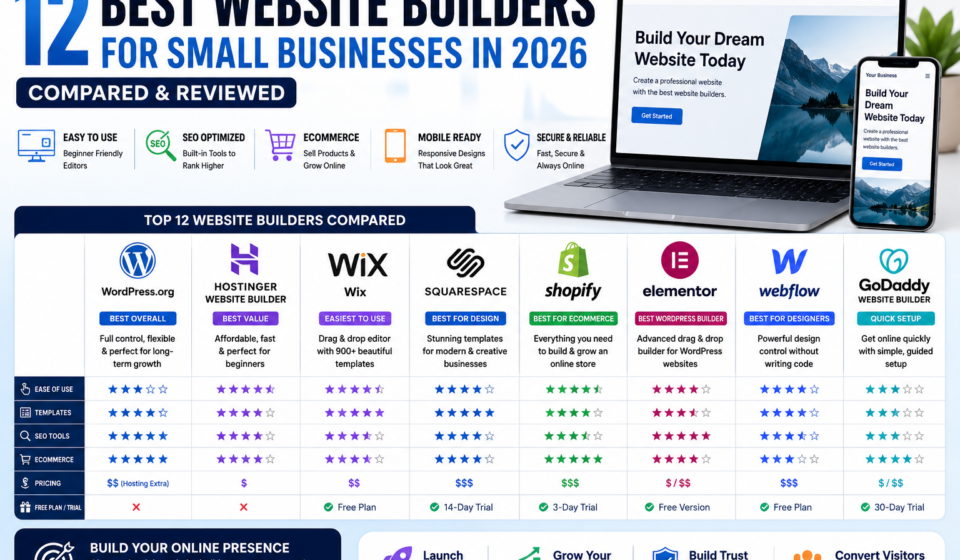
Quick Comparison Table
|
Website Builder |
Best For |
Free Plan |
Ecommerce |
SEO Features |
|
WordPress.org |
Full Control & SEO |
❌ |
✅ |
⭐⭐⭐⭐⭐ |
|
Hostinger Website Builder |
Beginners |
❌ |
✅ |
⭐⭐⭐⭐ |
|
Wix |
Ease of Use |
✅ |
✅ |
⭐⭐⭐⭐ |
|
Squarespace |
Design-Focused Websites |
Trial |
✅ |
⭐⭐⭐⭐ |
|
Shopify |
Online Stores |
Trial |
⭐⭐⭐⭐ |
⭐⭐⭐⭐ |
|
Elementor |
WordPress Design |
Free Version |
✅ |
⭐⭐⭐⭐⭐ |
|
Webflow |
Designers & Agencies |
Free Plan |
Limited |
⭐⭐⭐⭐ |
|
GoDaddy Website Builder |
Quick Setup |
Trial |
✅ |
⭐⭐⭐ |
Why Every Small Business Needs a Website
A business website can:
- Showcase products or services.
- Build trust with potential customers.
- Generate leads through contact forms.
- Publish educational content.
- Improve visibility in search engines.
- Support online sales.
- Provide customer support resources.
Unlike social media profiles, a website gives you full control over your content and branding.
How We Evaluated These Website Builders
We compared each platform using the following criteria:
- Ease of use
- Design flexibility
- SEO capabilities
- Ecommerce features
- Performance
- Mobile responsiveness
- Pricing
- Customer support
- Scalability
1. WordPress.org
Best Overall Website Builder for Long-Term Growth
WordPress powers a large portion of the web and offers unmatched flexibility for businesses that want complete control over their websites.
Key Features
- Thousands of themes
- Extensive plugin ecosystem
- Excellent SEO capabilities
- Blogging tools
- Ecommerce through WooCommerce
- Large community support
Pros
✔ Highly customizable
✔ Strong SEO potential
✔ Suitable for blogs, business websites, and ecommerce
✔ Scales as your business grows
Cons
✘ Requires separate hosting and ongoing maintenance.
Recommended For: Businesses that want maximum flexibility and long-term growth.
Get Started with WordPress Hosting
2. Hostinger Website Builder
Best Budget-Friendly Website Builder
Hostinger combines web hosting with an intuitive website builder designed for beginners.
Best Features
- AI website builder
- Responsive templates
- Ecommerce support
- Fast hosting
- Built-in SEO settings
Pros
- Easy to use
- Affordable pricing
- Good performance
Cons
- Fewer customization options than WordPress.
Start with Hostinger
3. Wix
Best for Ease of Use
Wix provides a drag-and-drop editor, making it simple for beginners to create professional-looking websites without coding.
4. Squarespace
Best for Modern Design
Squarespace is known for professionally designed templates that work well for service businesses, photographers, restaurants, and creative professionals.
5. Shopify
Best for Ecommerce
Shopify focuses on helping businesses sell products online with tools for inventory, payments, shipping, and marketing.
6. Elementor
Best WordPress Page Builder
Elementor extends WordPress with a visual drag-and-drop editor, allowing users to create custom pages without coding.
Comparison Table
|
Feature |
WordPress |
Hostinger |
Wix |
Squarespace |
|
SEO |
⭐⭐⭐⭐⭐ |
⭐⭐⭐⭐ |
⭐⭐⭐⭐ |
⭐⭐⭐⭐ |
|
Templates |
⭐⭐⭐⭐ |
⭐⭐⭐⭐ |
⭐⭐⭐⭐⭐ |
⭐⭐⭐⭐⭐ |
|
Ecommerce |
⭐⭐⭐⭐⭐ |
⭐⭐⭐⭐ |
⭐⭐⭐⭐ |
⭐⭐⭐⭐ |
|
Ease of Use |
⭐⭐⭐ |
⭐⭐⭐⭐⭐ |
⭐⭐⭐⭐⭐ |
⭐⭐⭐⭐ |
|
Scalability |
⭐⭐⭐⭐⭐ |
⭐⭐⭐ |
⭐⭐⭐ |
⭐⭐⭐⭐ |
Which Website Builder Should You Choose?
Choose WordPress.org if you want complete control, powerful SEO capabilities, and room to scale.
Choose Hostinger Website Builder if you’re looking for an affordable and beginner-friendly option.
Choose Wix if ease of use is your top priority.
Choose Squarespace if visual design is especially important.
Choose Shopify if your primary goal is running an online store.
Frequently Asked Questions
What is the best website builder for SEO?
WordPress.org is widely regarded as one of the strongest options for SEO because of its flexibility, plugin ecosystem, and control over technical optimization.
Do I need coding skills?
Most modern website builders offer visual editors, allowing users to build websites without coding knowledge.
Can I switch website builders later?
Yes, but migrating content can take time. It’s often easier to choose a platform that supports your long-term goals from the beginning.
Which website builder is best for beginners?
Platforms such as Hostinger Website Builder and Wix are generally considered beginner-friendly due to their drag-and-drop interfaces.
Final Verdict
Choosing the right website builder depends on your business goals, technical experience, and plans for future growth. For businesses that prioritize flexibility and long-term SEO, WordPress.org remains a strong choice. Simpler builders may be a better fit if you need to launch quickly with minimal setup.
Other Related Posts: