
Best AI Video Generators in 2026: Top 12 AI Video Creation Tools Compared
Video has become one of the most effective ways to communicate online. Whether you’re creating YouTube tutorials, product demonstrations, social media content, or business presentations, producing high-quality videos can be time-consuming.
AI video generators help simplify the process by turning text, images, or existing footage into polished videos. Many platforms also include AI-powered editing, voiceovers, subtitles, and templates that make video production more accessible for businesses and creators.
In this guide, we’ll compare the best AI video generators available in 2026 based on features, ease of use, output quality, collaboration tools, pricing, and overall value.
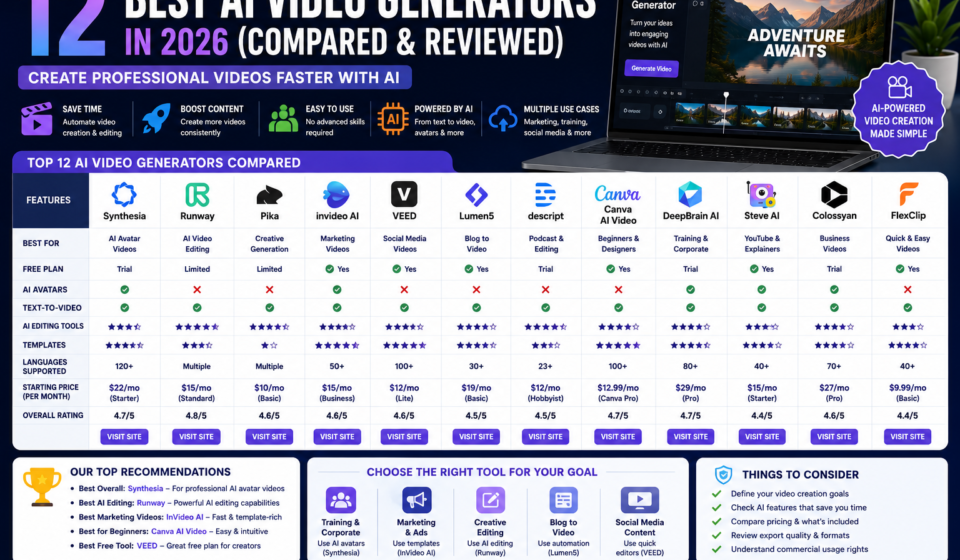
Quick Comparison Table
|
Tool |
Best For |
Free Plan |
Ease of Use |
AI Features |
|
Synthesia |
AI Avatar Videos |
Trial |
⭐⭐⭐⭐⭐ |
⭐⭐⭐⭐⭐ |
|
Runway |
AI Video Editing |
Limited |
⭐⭐⭐⭐ |
⭐⭐⭐⭐⭐ |
|
Pika |
Creative Video Generation |
Limited |
⭐⭐⭐⭐ |
⭐⭐⭐⭐⭐ |
|
InVideo AI |
Marketing Videos |
✅ |
⭐⭐⭐⭐⭐ |
⭐⭐⭐⭐ |
|
VEED |
Social Media Videos |
✅ |
⭐⭐⭐⭐⭐ |
⭐⭐⭐⭐ |
|
Lumen5 |
Blog-to-Video |
✅ |
⭐⭐⭐⭐ |
⭐⭐⭐⭐ |
|
Descript |
Podcast & Video Editing |
Trial |
⭐⭐⭐⭐ |
⭐⭐⭐⭐ |
|
Canva AI Video |
Beginners |
✅ |
⭐⭐⭐⭐⭐ |
⭐⭐⭐⭐ |
Why Use an AI Video Generator?
AI video tools can help you:
- Create marketing videos
- Produce YouTube content
- Turn blog posts into videos
- Generate subtitles automatically
- Create product demonstrations
- Build presentation videos
- Repurpose long-form content
- Save time during editing
They are particularly useful for businesses that need to publish videos consistently without a large production team.
How We Evaluated These Tools
Each platform was assessed based on:
- Video quality
- Ease of use
- AI editing capabilities
- Templates
- Voiceover options
- Collaboration features
- Export quality
- Pricing
- Commercial usage
1. Synthesia
Best Overall AI Video Generator
Synthesia specializes in creating professional videos using AI-generated presenters. Businesses can create training videos, onboarding materials, product explainers, and educational content without filming.
Key Features
- AI presenters
- Multiple languages
- Voice generation
- Custom branding
- Screen recording
- Video templates
Pros
✔ Professional-looking business videos
✔ Easy to update content
✔ Supports multilingual audiences
Cons
✘ Best suited to presenter-style videos rather than cinematic editing.
Recommended For: Businesses creating educational, corporate, or product videos.
Try Synthesia
2. Runway
Best for AI Video Editing
Runway offers advanced AI editing features, including background removal, object replacement, motion tracking, and text-to-video capabilities.
3. Pika
Best for Creative AI Video Generation
Pika focuses on generating imaginative videos from text prompts, making it popular among creators experimenting with visual storytelling.
4. InVideo AI
Best for Marketing Videos
InVideo AI helps users create promotional videos, advertisements, and social media content using templates and AI-assisted editing.
5. VEED
Best for Social Media Creators
VEED provides browser-based video editing with automatic subtitles, AI voiceovers, and collaboration tools for teams.
Feature Comparison
|
Feature |
Synthesia |
Runway |
Pika |
InVideo AI |
|
Free Plan |
Trial |
Limited |
Limited |
✅ |
|
AI Avatars |
⭐⭐⭐⭐⭐ |
⭐⭐ |
⭐ |
⭐⭐ |
|
Text-to-Video |
⭐⭐⭐⭐ |
⭐⭐⭐⭐⭐ |
⭐⭐⭐⭐⭐ |
⭐⭐⭐⭐ |
|
Video Editing |
⭐⭐⭐ |
⭐⭐⭐⭐⭐ |
⭐⭐⭐ |
⭐⭐⭐⭐ |
|
Ease of Use |
⭐⭐⭐⭐⭐ |
⭐⭐⭐⭐ |
⭐⭐⭐⭐ |
⭐⭐⭐⭐⭐ |
Which AI Video Generator Should You Choose?
The best choice depends on your goals:
- Best overall: Synthesia
- Best for AI editing: Runway
- Best for creative generation: Pika
- Best for marketing: InVideo AI
- Best for beginners: Canva AI Video or VEED
If you’re creating videos for different purposes, you may find value in combining multiple tools.
Frequently Asked Questions
What is an AI video generator?
An AI video generator uses artificial intelligence to help create, edit, or enhance videos from text, images, or existing media.
Can AI create videos from text?
Many AI video platforms can generate videos based on text prompts, though features and output styles vary by provider.
Are AI-generated videos suitable for businesses?
Many businesses use AI video tools for training, marketing, customer education, and internal communications. Final review and editing are still recommended before publishing.
Which AI video generator is easiest for beginners?
Tools such as InVideo AI, Canva AI Video, and VEED are generally beginner-friendly due to their templates and intuitive interfaces.
Final Verdict
AI video generators can help businesses and creators produce videos more efficiently while reducing editing time. The best platform depends on whether you prioritize AI avatars, creative generation, marketing workflows, or simple editing tools.
Other Related Posts: