12 Best Project Management Software for Small Businesses in 2026 (Compared & Reviewed)

Best Project Management Software for Small Businesses in 2026: Top 12 Compared
Keeping projects organized becomes increasingly difficult as a business grows. Missed deadlines, scattered communication, and unclear responsibilities can slow progress and affect customer satisfaction.
Project management software helps teams stay organized by bringing tasks, files, conversations, timelines, and reporting into one place. Whether you’re managing a remote team, running a marketing agency, or coordinating client projects, the right platform can improve visibility and collaboration.
In this guide, we’ll compare the best project management software for small businesses based on features, ease of use, automation, integrations, pricing, and scalability.
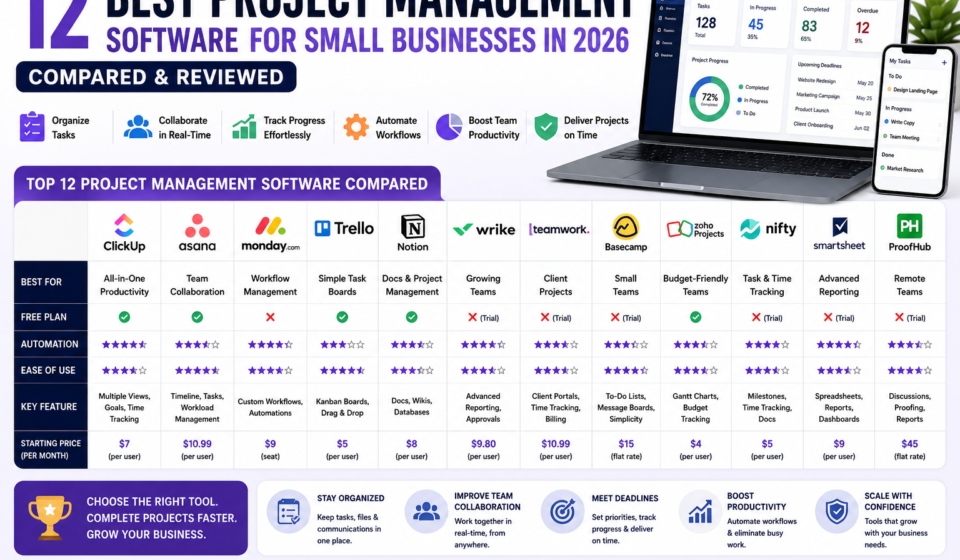
Quick Comparison Table
|
Software |
Best For |
Free Plan |
Automation |
Ease of Use |
|
ClickUp |
All-in-One Productivity |
✅ |
⭐⭐⭐⭐⭐ |
⭐⭐⭐⭐ |
|
Asana |
Team Collaboration |
✅ |
⭐⭐⭐⭐ |
⭐⭐⭐⭐⭐ |
|
Monday.com |
Workflow Management |
Trial |
⭐⭐⭐⭐⭐ |
⭐⭐⭐⭐ |
|
Trello |
Simple Task Boards |
✅ |
⭐⭐⭐ |
⭐⭐⭐⭐⭐ |
|
Notion |
Documentation & Projects |
✅ |
⭐⭐⭐⭐ |
⭐⭐⭐⭐ |
|
Wrike |
Growing Teams |
Trial |
⭐⭐⭐⭐⭐ |
⭐⭐⭐⭐ |
|
Teamwork |
Client Projects |
Trial |
⭐⭐⭐⭐ |
⭐⭐⭐⭐ |
|
Basecamp |
Small Teams |
Trial |
⭐⭐⭐ |
⭐⭐⭐⭐⭐ |
Why Project Management Software Matters
As businesses grow, relying on email chains and spreadsheets often becomes inefficient. A dedicated project management platform can help teams:
- Organize tasks and deadlines.
- Assign responsibilities.
- Track project progress.
- Share files and documents.
- Collaborate in real time.
- Reduce missed deadlines.
- Improve visibility across projects.
The right tool can streamline workflows and make it easier to keep everyone aligned.
How We Evaluated These Platforms
Each platform was assessed based on:
- Ease of use
- Task management capabilities
- Collaboration features
- Automation options
- Reporting and dashboards
- Integrations with other software
- Pricing and scalability
- Customer support
1. ClickUp
Best Overall Project Management Software
ClickUp combines project management, documents, goals, time tracking, dashboards, and automation into one platform.
Key Features
- Task management
- Multiple project views (List, Board, Calendar, Gantt)
- Built-in documents
- Time tracking
- Dashboards
- Workflow automation
Pros
✔ Comprehensive feature set
✔ Flexible customization
✔ Free plan available
✔ Suitable for teams of different sizes
Cons
✘ The wide range of features may require some onboarding for new users.
Recommended For: Businesses looking for an all-in-one productivity platform.
Start Free with ClickUp
2. Asana
Best for Team Collaboration
Asana helps teams organize projects, assign work, and monitor progress with a clean, intuitive interface.
Highlights
- Project timelines
- Task assignments
- Workflow automation
- Team communication
- Reporting
3. Monday.com
Best for Workflow Automation
Monday.com offers highly customizable workflows that can adapt to sales, marketing, HR, operations, and project management.
4. Trello
Best for Simplicity
Trello uses Kanban boards that make it easy to visualize tasks and move work through different stages.
5. Notion
Best for Documentation and Knowledge Management
Notion combines notes, documents, databases, and project management into a single workspace, making it ideal for teams that want to centralize information.
Feature Comparison
|
Feature |
ClickUp |
Asana |
Monday.com |
Trello |
|
Free Plan |
✅ |
✅ |
❌ |
✅ |
|
Automation |
⭐⭐⭐⭐⭐ |
⭐⭐⭐⭐ |
⭐⭐⭐⭐⭐ |
⭐⭐⭐ |
|
Dashboards |
⭐⭐⭐⭐⭐ |
⭐⭐⭐⭐ |
⭐⭐⭐⭐ |
⭐⭐ |
|
Collaboration |
⭐⭐⭐⭐⭐ |
⭐⭐⭐⭐⭐ |
⭐⭐⭐⭐ |
⭐⭐⭐⭐ |
|
Integrations |
⭐⭐⭐⭐⭐ |
⭐⭐⭐⭐⭐ |
⭐⭐⭐⭐ |
⭐⭐⭐⭐ |
Which Project Management Software Should You Choose?
The best choice depends on your team’s size and workflow:
- Best overall: ClickUp
- Best for collaboration: Asana
- Best for automation: Monday.com
- Best for simplicity: Trello
- Best for documentation: Notion
Consider starting with a free plan to evaluate whether the platform matches your team’s needs before upgrading.
Frequently Asked Questions
What is project management software?
Project management software helps businesses plan, organize, assign, and track work across projects and teams.
Is project management software worth it for small businesses?
Many small businesses find it valuable because it can improve organization, collaboration, and visibility into ongoing work.
Can I use free project management software?
Yes. Several providers offer free plans with features that are sufficient for many individuals and small teams.
Which project management software is easiest to learn?
Tools with visual interfaces, such as Trello and Asana, are often considered approachable for beginners.
Final Verdict
Project management software can improve coordination, reduce manual tracking, and help teams deliver work more efficiently. The right platform depends on your business processes, collaboration needs, and plans for future growth.
Other Related Posts: